A product launch video is the asset that tells the market a new product exists and gives people a reason to act: buy, sign up, book a demo. The strongest launches don't rely on one film. They use a core video, a set of short cuts for each channel and a stills library, all built from the same approved look. AI production makes that set practical for brands without a studio budget, because the visuals are generated rather than shot, and that is how we build launch content at Blurcandy.
This guide is for brand owners, marketers and e-commerce teams who need launch visuals that look expensive without a set, a cast and a reshoot schedule. It covers the formats, the structure, the production workflow and how to tell whether the video worked.
TL;DR
- A launch video has one job: build excitement and prompt a single action. Pick the action before you pick the format.
- Plan a set, not a single film: a core video, short social cuts, product stills and, for physical products, a few UGC-style ads.
- Show the product early, keep the hero film tight and make every cut work with the sound off.
- AI production removes physical models, sets and reshoots. Approve the look before anything is built, and have a person check every frame.
- Measure against the action you chose: conversion on the product page, click-through on the ads, completion on the video.
Table of Contents
- What a launch video is for
- Choosing the format
- How to structure the hero film
- Build a launch set, not a single video
- Producing launch videos with AI
- What it takes, by product type
- Adapting the launch across channels
- Measuring whether it worked
- Where Blurcandy fits
- FAQ
- Sources
What a launch video is for
A launch video announces a new product, feature or major change. It gets shared on social media, in email and on the product page itself. Descript's launch guide frames the goal as building excitement and prompting the action you want, whether that is a download, a demo booking, a purchase or a signup.
That framing matters because it separates a launch video from a brand film. A brand film can be atmospheric and open-ended. A launch video is judged by what people do after watching it. If you can't finish the sentence "after watching, I want the viewer to ___", the brief isn't ready.
The same logic applies to "launch content" more broadly. The film is the centerpiece, but the launch also needs the images, the cutdowns and the ads that carry the message into feeds, listings and inboxes. Treat all of it as one production, not five separate jobs.
Choosing the format
The right format depends on what you are launching and who has to be convinced.
| Format | Best for | What it shows |
|---|---|---|
| Hero launch film | Any new product with a visual story | Desire, the look and feel, the brand world |
| Product demo | Products with features that need explaining | How it works, in use |
| Explainer | New categories or unfamiliar problems | The problem, then the solution |
| Founder or team update | Brands with a face people trust | Why it was made, direct and personal |
| 3D or CGI product film | Products that are hard to film, still in development or have internal detail | Cutaways, materials, motion no camera can get |
| UGC-style ad | Paid social and marketplace placements | A real-feeling person using or reacting to the product |
For physical products, Descript points to product overviews that show use and benefits. For consumer brands in fashion, beauty, footwear, food or home, the most reliable pairing is a hero film for desire plus short in-use cuts for conversion.
If the product is electronics or anything with engineering behind it, a 3D film does work a camera can't: exploded views, internal components, a material close-up that stays sharp. Our 3D product animation and tech photography work is built for that case.
How to structure the hero film
Most launch films that work follow the same order, whatever the product.
- Open on the product or the problem. Viewers decide within seconds whether to keep watching. Don't spend that time on a logo animation.
- Show the product in use. One clear moment that shows what changes for the customer.
- Give two or three reasons, not ten. Pick the benefits that matter to this buyer and show each visually.
- Close with one call to action. The same action you defined in the brief, said and shown on screen.
On length, a 2026 write-up of Flowjam's launch video index recommends getting the product on screen within the first 3 to 10 seconds and keeping the core asset between 30 and 90 seconds. Treat those as working ranges for a hero film, not rules. A teaser can be 10 seconds. A demo for a complex product can run longer, as long as each scene earns its place.
Two habits save the most reshoot time later:
- Write for sound-off viewing. Feeds autoplay muted. Use on-screen text and visuals that make sense without audio, then add sound as a bonus.
- Plan the vertical version first. If the film must live in Reels, Shorts and Stories, framing it for 9:16 at the start is cheaper than reframing a widescreen film later.
Build a launch set, not a single video
A launch runs in phases, and each phase wants different content. A simple three-stage plan works for most brands:
- Before launch: teasers and sneak peeks for your audience, plus a clean set of visuals for press and partners.
- Launch day: the hero film, product stills for the listing, and the first wave of paid and organic social cuts.
- After launch: in-use clips, UGC-style ads, behind-the-scenes or design stories, and seasonal or audience-specific variations.
The practical problem is volume. One launch can need a 60-second film, five 15-second cuts, a dozen stills and a few ad variants. Shot conventionally, every extra deliverable adds crew time, model fees and another day on set. That is where most launch budgets break.
If your launch content also feeds paid social, our guide to social media ad creatives covers which variations are worth making, and the social media content production workflow shows how to keep the post-launch pipeline running.
Producing launch videos with AI
AI production replaces the physical parts of a shoot: the studio, the set, the models, the lighting rig. The product and the brief stay; the logistics go. For launch work, that changes three things.
Speed. Without a booking, a set build and a reshoot window, the timeline compresses. Our product photography is typically delivered within 24 hours, and the same approach shortens film and content timelines.
Consistency. Every asset in the launch set comes from the same approved look, so the film, the stills and the ads match. On a conventional multi-day shoot, lighting, models and styling drift between setups.
Flexibility. Need the product in a new colorway, a different setting or a new aspect ratio? You change the brief rather than re-book the shoot.
The workflow we use for launch projects:
- Brief and references. You share the product, the goal, the audience and the look you want.
- Look frames. Before production starts, you approve look frames: still images that fix the style, lighting and mood. This is where most of the creative decisions get made, and where changes are cheapest.
- Production. We build the film and the stills using generative AI models customized for your industry, working from your product and brief.
- Frame-by-frame check. Every frame is checked by hand for accuracy to your product and brief.
- Delivery. You receive ready-to-use visuals for the launch, the product listing and social channels.
You can see how this plays out across categories in our portfolio of AI ad films and commercials, and read the step-by-step in how AI commercial production works.
Start with a hybrid workflow
The Canadian Marketing Association's AI video playbook recommends a hybrid approach: use AI for stages such as background creation, concept visualization and content variations, then apply human editing, sound design, color grading and branded elements. The same playbook suggests beginning with supplemental assets, like alternate social versions, before relying on AI for the most critical campaign pieces.
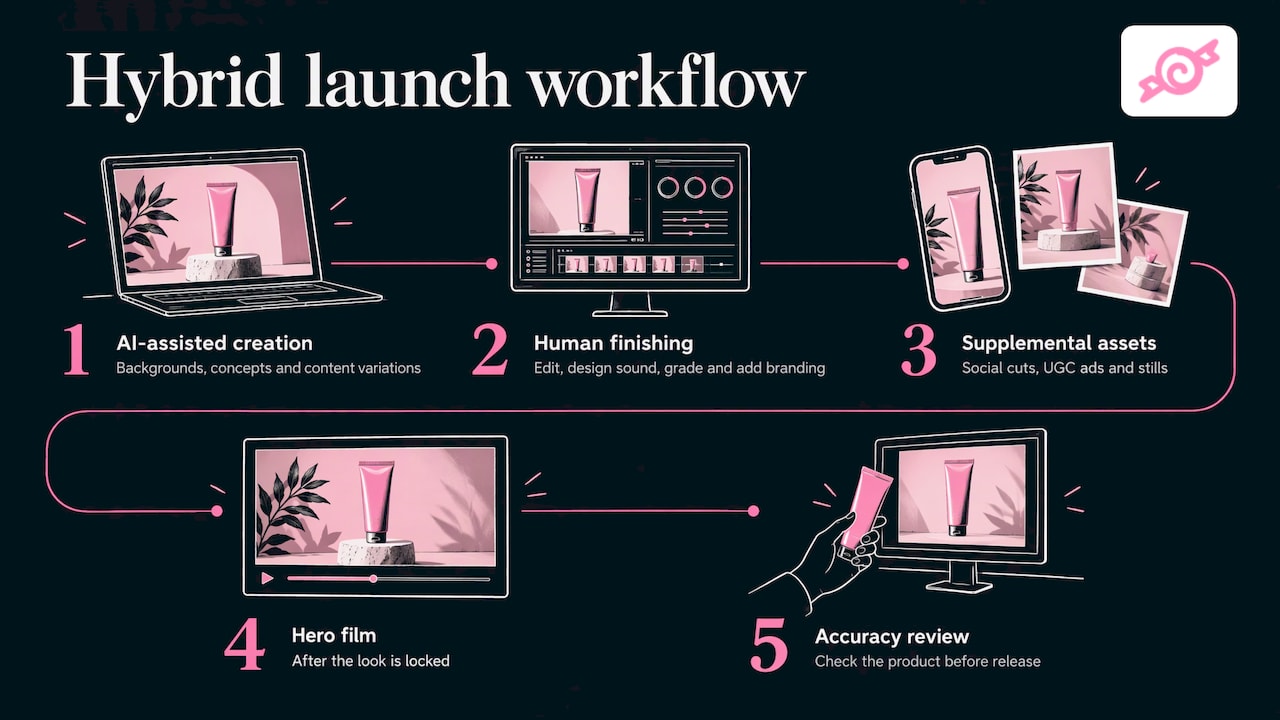
That matches how a launch set is built. The social cuts, UGC-style ads and stills are the natural first step; the hero film follows once the look is locked. Human review at the end keeps the product accurate, which for a launch is non-negotiable: the first time customers see your product should be the right one.
Keep AI-made content honest
If your launch uses AI-generated people in testimonial-style ads, be careful with the wording. The FTC's final rule on fake reviews and testimonials covers reviews and testimonials that misrepresent that they come from someone who doesn't exist or who had no real experience with the product, and it names AI-generated fake reviews specifically. In practice, UGC-style ads should demonstrate the product and carry your brand's own message, not present an invented customer as a real one giving a real review. If you sell in the US, run launch copy past your legal adviser.
What it takes, by product type
The set you need depends on what you sell.
- Fashion and apparel: model photoshoots and short on-model clips. AI models mean no casting, travel or sample shipping. See fashion photoshoots and ad films.
- Beauty and skincare: texture, glow and pack shots, where CGI handles liquids and close-ups well. See beauty photography, CGI and ads.
- Footwear: motion, angles and detail. See shoe and sneaker content.
- Food and beverage: appetizing hero shots and pour or splash moments without a food stylist on set. See food and beverage content.
- Home and furniture: products in styled rooms without building the rooms. See furniture and home decor visuals.
- Bags and accessories: lifestyle context and fine detail. See bags and accessories content.
Adapting the launch across channels
One approved look should travel everywhere. A workable split:
- Product page and marketplace listings: clean stills plus a short in-use clip. Video on the product page is where launch interest turns into purchases.
- Paid social: 6 to 20 second cuts with the hook in the first seconds, in 9:16 and 1:1, each ending on the same call to action.
- Organic social: teaser, reveal and in-use posts spread across launch week.
- Email: a still or a short looping clip leading to the product page, with the film linked rather than embedded.
- Website and press kit: the hero film plus a folder of approved stills.
Building all of these from one look, rather than commissioning each separately, is what keeps the launch coherent. For a deeper look at the format side, see our guide to product video production.
Measuring whether it worked
Measure each asset against its own job.
| Asset | Primary metric | Question it answers |
|---|---|---|
| Hero film | Completion rate, clicks to product page | Did people stay and follow through? |
| Social cuts | Hook rate, click-through, cost per click | Did the first seconds stop the scroll? |
| Product-page video | Conversion rate, revenue per visitor | Did the video lift buying? |
| Stills | Listing click-through | Did the images earn the click? |
The cleanest test is an A/B comparison. Videowise's e-commerce video guide reports a two-month test at one brand where on-site video lifted conversion by 7.8% and revenue by 7.24%. Results vary by product and traffic, so treat it as an example of how to run the test, not a promise. Compare the page with the video against the page without it, over a long enough window to cover your normal traffic cycle.
Then feed the findings back in. If one cut wins on hook rate, make more variations of it. If the demo moments convert best, lengthen those in the next batch. Because AI production doesn't need a new shoot to make variations, the learning loop is faster.
Where Blurcandy fits
If you need the full launch set, from hero film to social cuts and stills, we produce it without physical models, sets or reshoots. You approve the look frames before production, every frame is checked by hand against your product and brief, and the output is ready for your listings, ads and social channels. We have served over 200 brands, with a client rating of 4.8/5.

Projects are quoted by scope and deliverables. Tell us what you are launching and where it needs to run on our services page, and we will scope the set.
FAQ
How long should a product launch video be?
For a hero film, 30 to 90 seconds is a common working range, with the product on screen in the first few seconds. Teasers and ad cuts can be much shorter. Decide length by how much the viewer needs to know before taking the action.
What should a product launch video include?
The product, shown early; the product in use; two or three clear reasons to care; and one call to action. Add on-screen text so it works with the sound off.
Can AI make product launch videos?
Yes. AI production can create the film, the product stills and the social cuts without physical models, sets or reshoots. Look frames are approved first, and each frame is checked by hand for accuracy to the product.
How many versions of a launch video do I need?
Plan one hero film and a set of shorter cuts for each channel you will use, in the aspect ratios those channels need. Add a few ad variations so you can see which hook and message perform best.
Sources
- Product Launch Video: How to Build Buzz Around a Release (Descript)
- Product Launch Videos That Convert SaaS Viewers (Fundl)
- AI Video Generation playbook (Canadian Marketing Association, 2025)
- FTC final rule banning fake reviews and testimonials
- Video Marketing for Ecommerce: The Complete Strategy Guide (Videowise)